How to Keep Your US Phone Number While Abroad
In this blog post, I’ll teach you how you can keep your US phone number when living, traveling, or moving overseas.

Whether you’re going abroad for the first time or a seasoned traveler, dealing with phone numbers and data can be complicated. In this blog post, I will explain how you can port your number to Google Voice to maintain your US cell phone number when going abroad. I’ll also offer some tips about how and where to get an E-Sim abroad.
I have lived outside of the United States for the majority of the past 22 years. My friends and family have about 6 different cell phone numbers for me in their contact list. They’re constantly asking which number they should use to contact me.
After so many years of living abroad, and changing my phone number dozens of times, I have finally figured out the best strategy for maintaining the same US phone number while I’m in the US and when I’m abroad. I’m here to share my secrets with you. This blog post will help you with everything you need to know about phone numbers abroad.
Short on time? Here are the basics:
- Create a WhatsApp account
- Port your number to Google Voice ($20)
- Use Mint Mobile while in the US
- Use the Airalo App for short-term data
- Buy a local E-Sim
Traveling soon? Get Ready at a glance:
Get travel medical insurance with SafetyWing.
Book your stay with Booking.com.
Check Flights with Skyscanner or Hopper.
Rent a car with RentalCars.com.
Download the Airalo app and get a local Esim.
See all my Travel guides on the Thatch app.
Take a tour with GetYourGuide or Viator.
Have a 1:1 consultation with me in advance!
Keep My US Phone Number – My Story
Because I travel and spend so much time abroad, I got tired of constantly changing my phone number. Nobody could keep track of me, I always had to update my friends and family with new phone numbers every few months or years. It was so annoying.
Even more annoying than constantly changing phone numbers, was not having a US-based number at all. This made logging into certain online accounts complicated, particularly if they required dual authentication. My credit card companies, my online bank, and even some social media accounts required a US phone number.
I often had to use my sister’s number and then time it right so that she could receive a text message and tell me the code. This was not simple or easy when living in different time zones. I wanted to be able to access my accounts without involving my sister whenever I wanted.
Maintaining a US-based number while abroad solved so many of these problems. I have now been able to maintain the same US-based phone number for the past three years. Over these last few years, I’ve finally found a strategy that works well and I want to share that with you.
How I keep my US number
- I created a Google Voice number so that I could have a consistent phone number for things like banking, social media, WhatsApp, etc.
- I’m able to receive text messages from US-based numbers via the Google Voice app (and email) that I installed on my phone.
- When I return to the US, I transfer that number from Google Voice to Mint Mobile (it’s free). I buy the Mint Mobile package that aligns with my stay in the US.
- When I leave the US, I port that same number back to Google Voice (costs $20).
Read More: Get Started Traveling (Even if You’re Broke)
How to Keep My US Number (follow these steps)
Follow these steps to keep your US number while traveling or living overseas. I’ll tell you which apps to download and all the important links you need to follow.
One of the first steps is to make sure your phone and your phone number are unlocked.
Just to note, these instructions are for people who spend large periods outside of the United States. If you are planning to travel for just a few weeks, you should maintain your current phone service. You can buy a local SIM card in the country you’re traveling to, to make local calls and texts for a reduced cost.
Create a WhatsApp account
If you’re planning to travel overseas, it’s just a good idea to have a WhatsApp account. It is the most used messaging app in the entire world.
Why should I create a WhatsApp account?
You should create a WhatsApp account in order to maintain contact and stay in touch with your friends and family outside of the country. Also, many countries use WhatsApp as an integral part of their business model. It has end-to-end encryption.
For example, WhatsApp is so integrated into society in Argentina, that I would make nail appointments, doctor appointments, contact housing rentals, message a private taxi, etc using WhatsApp. If you want to be connected to the world outside of the United States, you need to have WhatsApp.

Benefits of having a WhatsApp account
The entire world uses WhatsApp. It may not appear that way if you’ve spent the majority of your life in the United States. But this helps helps you to stay in touch.
You can also avoid the green bubble vs. blue bubble drama that comes with having friends with both iPhones and Androids. You can do video chats on WhatsApp, and it is honestly the best app for creating group chats as well. This app also makes location sharing incredibly simple.
WhatsApp also has a desktop version so you can type all of your messages out, rather than text on your phone.
WhatsApp Suggestions
I suggest using your main phone number when creating your WhatsApp account. When you get a new E-Sim or SIM card, it will give you the option to use your new number or maintain your previous number. Make sure your main number is the number that stays connected to your WhatsApp account.
Create a Google Voice Account
I finally created a Google Voice account about 3 years ago, and it has honestly changed my traveling life. Things are so much more simple and cause me less stress.
How to Create a Google Voice Account
In order to create a Google Voice account, you need to have an already existing US-based phone number. If you don’t have a US number, ask a sibling or a friend to use theirs in your initial setup. I created my Google Voice number from a US number I was using on a temporary Verizon SIM card a few years ago.
*Note: Choose a number that is easy to remember, if you intend on keeping this number for a long time (as was my case).
Steps to create a Google Voice account
- Go to voice.google.com
- Sign in to your Google Account
- Review the Terms of Service and Privacy Policy
- Click Continue
- Search for available numbers by area code or city*
- Select a number
- Follow the on-screen instructions
You don’t need to create a new phone number if you already have a Google Voice account from before. If you already have a Google Voice account, skip to the “How to port your number to Google Voice” heading below.
Download the Google Voice app
You’ll need to download the Google Voice app on your phone. This is where you will receive your messages. If you no longer have a US-based phone service (Verizon, T-Mobile, etc.) while abroad, your text messages will now go to your Google Voice app rather than your messaging app.
You can also receive your messages via email (forever) and the original phone number (for 90 days) you used to sign up with. I selected not to receive double messages on that original phone number. However, I do like to receive an email from Google Voice letting me know I have a new message, just in case I missed it on the app.
How to port your number to Google Voice
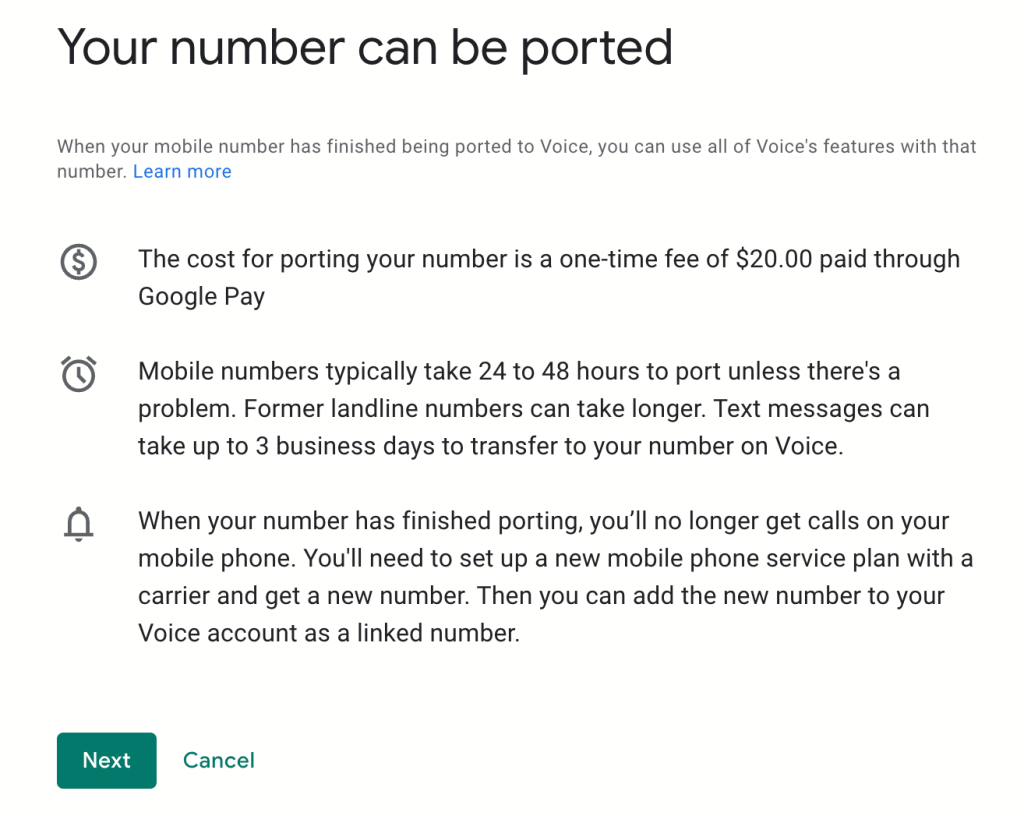
Once you create a Google Voice account, and choose a number, you’ll need to now “port” your number to Google Voice. You can take a look here to see how porting works. But basically this is what it says:
- It costs $20.
- Your current phone service may charge you an early termination fee (Mint Mobile does NOT charge you a termination fee).
- You can choose which number you want as your primary number (your original number or the new Google Voice number you just created).
Steps to port your number to Google Voice
You can click on this link to read detailed instructions from Google. I have also listed them here:
- On your computer, open Google Voice.
- At the top right, click Settings
- Go to the “Account” section.
- Under “Port a number to Google Voice,” click Port a number.
- Click Get Started.
- Enter the phone number you want to port.
- You’ll get a text message with a 6-digit code. If you prefer, you can get the code on your phone.
- If your number can be ported, you’ll be prompted to enter your carrier account information.
- Account number: I had to message Mint Mobile to receive this number for security purposes. Their chat messaging is very fast. You must provide your phone number, full name, and email to the assistant.
- Porting pin: The last 4 numbers of your phone number.
- Review the porting request. To proceed with payment through Google Pay, click Next. If all steps are successful, they email you a detailed receipt. If not, they will also send you an email to inform you the porting failed.
- You shouldn’t need to cancel your service with your US carrier because it will be canceled automatically when the number gets ported out. However, you may want to clarify with them to confirm. In my personal experience, Mint Mobile cancels the line automatically, and I don’t need to contact them to cancel.


Check your Google Voice Settings
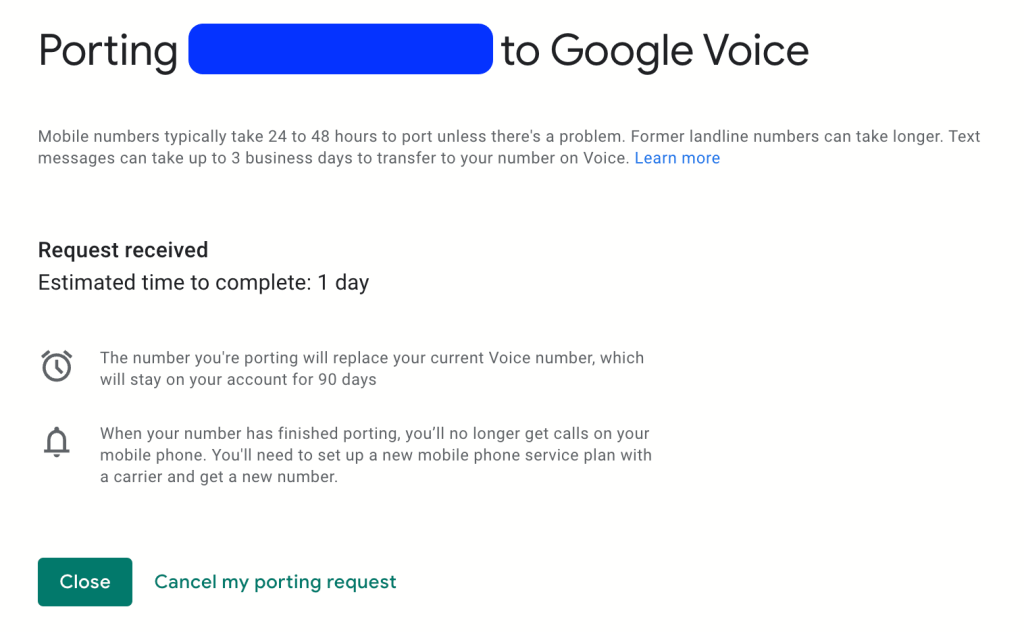
Once you have successfully ported your US number to Google Voice, you may want to double-check your settings to ensure you’re able to make and receive phone calls. In the screenshots below, you can see my settings.


Note: It can take up to 48 hours to port. In my personal experience, it usually takes 24 hours. So make sure you port your number at the last minute or you might lose service before you’re ready.
Benefits of having a Google Voice Account
Having a Google Voice account has allowed me to maintain the same US phone number for years. This allows me to keep all my online accounts updated and avoid all dual-factor authentication issues. I can take care of my own business instead of relying on others to send me login codes.
Having a Google Voice account (and app) allows me to maintain contact with friends and family via message. I can even make and receive calls to other US phone numbers.
Get a Short-term E-Sim with Airalo
Now that you have successfully ported your phone number from your US phone service provider to Google Voice, you’re still going to need some data while traveling. That’s where the E-Sim comes in.
I like getting local E-Sims (or a physical SIM card if your phone takes it) because they are usually the most affordable. That said, it is not always easy to make it into a local phone store within the first day or two of arriving in a new country. Therefore, I like starting out with an E-Sim package right away so I can have instant data.
Several companies offer E-Sim services, but my favorite is called Airalo.
You can also check this E-Sim aggregator site called EsimDB.
What is an E-Sim?
An E-Sim is an electronic SIM card. It essentially provides you with data while in a foreign country. An E-Sim allows you to immediately have data on your phone without having to physically change SIM cards.
In order to use Airalo, you need to download the app. You can select the country or region you’re traveling to, and then select the plan that works for you. You can purchase your E-Sim package in advance.
When you arrive in your new country, you simply need to connect to the internet, select your E-Sim, follow the instructions, and within minutes you’ll have data with a local phone service provider.
I’ve even done this while waiting at the immigration line in the US, Puerto Rico, Egypt, and Italy.

Why do I need a short-term E-Sim when I’m traveling?
Unless you want to completely detach, you will most likely want some data on your phone. Data gives you access to your online maps, look up restaurants and info, etc.
I suggest purchasing a 1-2 day package from Airalo. This will give you access to data right away when you arrive in a new country. With this data, you can call a taxi driver on WhatsApp, get in touch with your Airbnb host, message your family back home, etc.
When you have a little data to start, you don’t have to stress yourself out looking for a phone service provider shop in the new country right away. This allows you to take your time and find a local phone company after you have a chance to eat, sleep, and get a little settled.
Read More: Travel Hacking Tips to Save You Money
Pros and Cons of an E-Sim with Airalo
While Airalo is great, nothing is perfect. Here are the pros and cons of using this type of service from my personal experiences.
Pros of using Airalo
I love having access to E-Sims on Airalo for when I travel. I can have several E-Sims all in the same app. It’s easy to activate the new E-Sim with Airalo with their simple instructions. They also have great customer support. I’ve chatted with them on several occasions.
Airalo has a ton of plans available for over 200 countries around the world, so you’re sure to be able to find one that works for you. In some countries, it is against the law for local phone service providers to sell E-Sims, so using a third-party app like Airalo allows you to have data while traveling in that country.

For example, I spent a month in Egypt in early 2024. This is a country that does not allow you to purchase an E-Sim from a local provider. So I purchased a package from Airalo and was able to get data right away. When I used that data, I was able to easily ‘top up‘ with the click of one button.
I also like to use Airalo, rather than a SIM from a local provider, when I am in a country for just a short period. For example, I spent just 5 days in Puerto Rico, and 10 days in Italy. I really didn’t want to spend any of my precious travel time trying to get a local SIM card. So, I just purchased a package from Airalo that covered the length of time I was in those countries.
I have even used Airalo to purchase packages in the United States when I was there for just a few weeks or a few months. Too short of a time to get a package from Mint Mobile or another provider that requires a contract.
Cons of using Airalo
While Airalo obviously provides a lot of positives, there are a few negatives as well.
When you purchase an Airalo package, you are only receiving data. Airalo does not provide you with a local phone number. This means you cannot make local phone calls or send text messages to local numbers.
This is another reason why WhatsApp is necessary to have because it is a web-based system. If you can’t make local calls, you can still use WhatsApp to text or call others who have WhatsApp.
One strange experience that I had with Airalo in the United States, was that it blocked TikTok completely. While using the Airalo E-Sim, I was completely locked out of my TikTok account in the US. When I left the US and got a new E-Sim, TikTok worked again.
The last downfall of Airalo is that it tends to be much more expensive than a local service provider. For example, if I purchase a 3Gb/30-day package from Airalo for Argentina, the cost is $15.50. Then compare that to the local service provider, Claro. With Claro, I pay around $7 for a 10Gb/30-day package.

Buy a Local E-Sim
Using Airalo is great for a couple of days, but after that, it’s just too expensive. Local phone service providers always offer more affordable rates. As much as possible, I would like to purchase a local E-Sim from a local company.
How can I find a local phone company?
You can always do a Google search for local providers in each country. You can also check the Airalo app to see which company they use when providing data. For example, if you check on Airalo, you can see that Argentina uses Abrazo, Egypt uses Giza Mobile, Italy uses Mamma Mia, etc. Then you can search for those companies.
That said, those are not always the best companies for finding a local SIM card. For example, I know that the best company in Argentina is Claro, in Italy it’s Tim, and in Egypt, it’s Orange or Ooredoo.
You may also see phone companies with kiosks at the airport when you arrive. I purchased my E-Sim from Ooredoo in the Tunis airport, and it was super quick, easy, and cheap. I was in Tunisia for 2 months, so I purchased a 30-day package and then topped up at another Ooredoo store a month later.

You can also ask a local, or search Google Maps for a SIM card, and see what comes up. You can also often buy a SIM card at a gas station, kiosk, or phone carrier storefronts.
Once you buy the SIM card or E-Sim, you can top-up credit at most gas stations, kiosks, or phone carrier storefronts.
Benefits of a local E-Sim
With a local E-Sim, you’ll get the most affordable data package. You will also receive a local phone number which will allow you to make local phone calls and text local numbers. You’ll have regular service, just like a local. In most places around the world, you can do pay-as-you-go, rather than signing 1-2 year contracts like in the US.
Why do I need my US number and a local number?
A local number allows you to have an affordable data package and make local calls. However, having a US phone number while overseas allows you to maintain contact with friends and family as if you were inside the United States. Also, it allows you to maintain one consistent phone number with all your online accounts.
You can have both at the same time.
Create a Mint Mobile Account (when you go back to the US)
I want local phone service when I return to the United States after months or years abroad. I always use Mint Mobile for this.
Benefits of Mint Mobile
I’m honestly so grateful for Mint Mobile. It makes my complicated nomadic lifestyle a lot easier for me. Most US phone service companies (Verizon, T-Mobile, etc.) make you sign long-term contracts.
Mint Mobile allows you to receive service in 3-month, 6-month, or 12-month increments. When you sign up initially, you can get unlimited data for the first 3 months at just $15/mo. You do need to pay upfront though. So it would be $45 upon signup, and then you get service for the next 3 months.
If you want to continue beyond the initial 3 months, then you can choose the plan that works the best for you. Keep in mind that the longer plan you choose, the better prices you’ll receive. Even if you’re only in the US for 6-weeks, $45 is a great price.

Because there are no contracts, you can close your account whenever you want without a penalty. However, you will lose the money you paid upfront at the start of your x-monthly plan.
Mint Mobile also has great customer service. They have been a big help whenever I’ve had questions about porting my number out to Google Voice or restarting my service. You’re talking to real people and the wait time is usually just 2-3 minutes.

Read More: Pros and Cons of the Digital Nomad Lifestyle
How can I create a Mint Mobile account?
Creating a Mint Mobile account is very easy. Just go to the Mint Mobile website, and fill in your zip code and the type of phone you have. It will then inform you what type of coverage is available.
You can then select the plan that works best for you. Remember that new customers get unlimited data for $15/mo for the first 3 months. After you select the plan, choose whether you want a physical sim mailed to you or the E-Sim option. Keep in mind that you need to pay for the entire plan upfront.

If you choose the E-sim option, you will receive an email after paying. Click the orange button “Activate E-sim.”
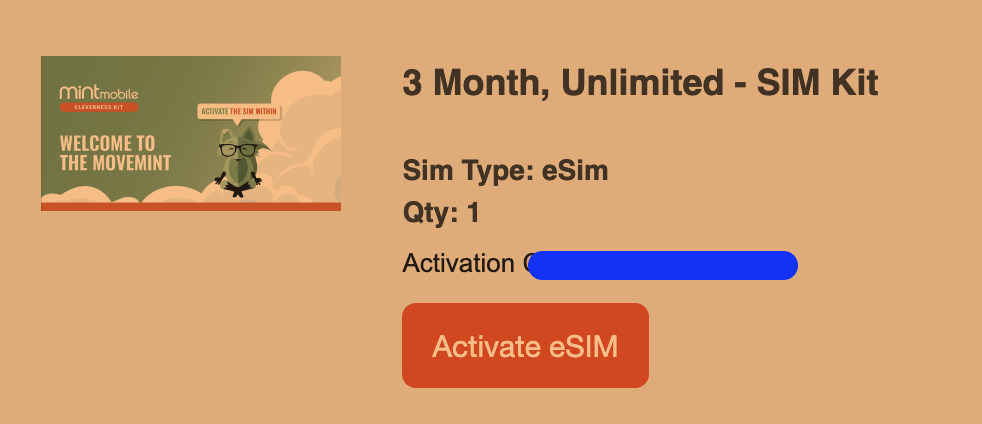
That will open a new browser tab. From there, completing the setup is incredibly easy. If you have any questions, you can chat with them. In my experience, the customer service is fast, reliable, and helpful. Keep reading and you can see the process down below.
How can I port my number to Mint Mobile?
After you create your Mint Mobile account, they will ask if you want a new number or if you want to bring your existing number over. Select the option ‘Transfer Number,’ and then follow the on-screen prompts during the activation process.

If you’re porting from Google Voice, you just need to search for that in the search bar and then click on it when that option pops up.

During the process, Mint Mobile will ask for these pieces of information:
- Your current phone number
- Your current account number (your 10-digit phone number: unlock it first in your Google Voice account)
- The PIN or “Transfer PIN” (the number you use for the GV voicemail)
- Your billing ZIP code


In my experience, the transfer takes just a few minutes (up to 1-2 hours). You can refresh the page after a few minutes.

How do I activate my E-sim with Mint Mobile?
When the transfer is complete, a QR code will pop up. If it doesn’t pop up after a minute, just click “refresh status.” Then scan that QR code with your phone and follow the prompts to activate the new E-sim. Make sure your phone is connected to WiFi.

This should only take a couple of minutes. Once the activation is complete, go to your settings (settings-cellular), scroll down to your list of eSIMs, and make sure your new plan (probably marked as ‘primary’) is turned “on,” and all other SIMs are turned “off.” If you click on the new line, you can change its name to “Mint Mobile” or whatever.


Once it’s active, you will receive a few text messages to confirm this. Then you should be good to go!
This is the cheapest way to keep a phone number since Mint Mobile does not charge you to bring in your existing number (from Google Voice or elsewhere).
Helpful Links from Mint Mobile:
How to transfer your number from all available carriers.
How to transfer your number to Mint Mobile.
Travel Insurance While Abroad
It is definitely a good idea to get travel insurance when you go abroad. You never know what could happen. I used my credit card’s car rental insurance which I was super grateful to have, while in Tunisia. For my personal health, I get travel medical insurance.
I use SafetyWing, which is great travel medical insurance created by nomads for nomads. You can sign up for as many days as you need, and cancel whenever you want. They have particularly good prices, especially for those under 40 years old. Check them out here.
Read More: Tips for Traveling with Friends
Keep My US Phone Number FAQs
If you’re moving abroad and want to keep your current phone number, here are a few additional questions and answers for you.
Is it easy to keep my number if I go abroad?
Yes, it is easy. If you follow the steps I outlined above, you should have no problem keeping your US cell phone number if you go abroad. I alternate between Mint Mobile (when I’m in the US) and Google Voice (when I’m abroad), and the system works great for me.
Do I need to port out my US number while traveling?
If you are going on a short holiday, you don’t need to worry about porting your number to Google Voice. You can easily keep your US number while overseas. Continue to maintain your regular service with your chosen provider.
Normally US phone providers will give you the option to use your service while abroad, but it’s expensive, around $10/day. Because of this, I suggest rejecting the $10/day “deal,” and simply using an E-sim from Airalo, or buying a SIM from a local company in the country you’re traveling in. It will be much more affordable that way.
What E-Sim companies are available to use?
There are several E-Sim companies out there. My personal favorite that I always use is Airalo. They were one of the first third-party E-Sim companies out there, and still have the most affordable prices. They also have great customer service and are very reliable.
Some other companies are:
Should I keep my US phone service active?
You should only keep your US phone service active while you’re overseas if your trip is short or temporary. Many US providers offer a service to maintain your number for you for several months for a small price.
I use the Google Voice-Mint Mobile strategy because I don’t live anywhere consistently or have a consistent phone service. For digital nomads, this strategy is the best option that allows you to always maintain a US phone number while abroad or in the US.
Can I use my US number from another country?
Yes. If you port your number to Google Voice, you can still use your US phone number from another country. The app allows you to send and receive text messages with other US-based numbers. You can also make and receive phone calls with other US numbers.
Final Thoughts on How to Keep My US Phone Number While Abroad
I hope I have sufficiently answered all of your questions about keeping your US phone number while living or traveling abroad. After years of experimentation and dozens of international phone numbers, the combination of Google Voice and Mint Mobile has proven to be the best strategy. It is affordable and works seamlessly with my lifestyle.
TRAVELING SOON?
INSURANCE: Cover yourself with travel medical insurance by SafetyWing.
FLIGHTS: Get the best flight deals with Skyscanner and set flight alerts with Hopper.
STAYS: Check out hotels and apartments with Booking.com and Vrbo.
RENTAL CARS: Get the best deal on rental cars with Discover Cars or RentalCars.
GOING HIKING? Get a 30% discount off your yearly AllTrails+ Account (code: nickiposts30)
eSIM: Get an international eSim with Airalo.
CITY GUIDES: Save time and purchase pre-made city guides with Thatch.
CITY TOURS: Book your tour with GetYourGuide and Viator
LUGGAGE: Get the best carry-on suitcase here.
CREDIT CARD: Start earning travel points with the best travel credit card.
BUENOS AIRES GUIDE: Purchase my Buenos Aires travel companion here.
CONSULTATION: Book a 1:1 travel consultation with Nicki here.
SUBSCRIBE: Get the Nicki Posts Travel Stuff newsletter every month.
TRAVEL BETTER: Check out my Travel Tips and best Travel Resources pages.
MORE? Check out more on my LINKS page to find me in more places!





You must be logged in to post a comment.